07 Mar
Check out our youtube channel
Welcome to Chemius.
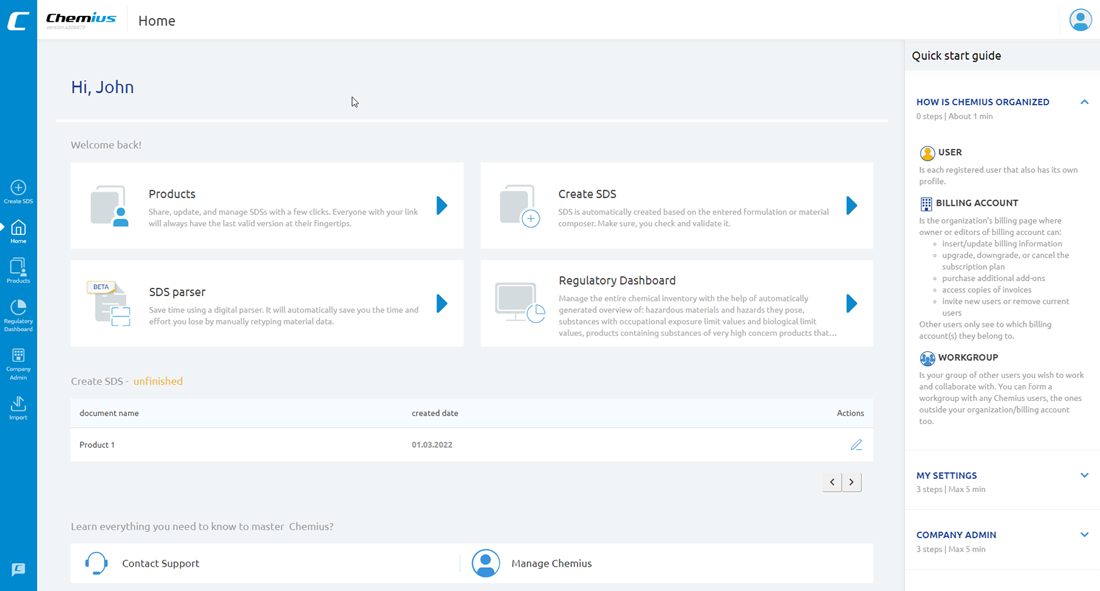
This is the first screen you see when you sign into Chemius.
Let me quickly show you around.
This is the home screen.
Here you can find frequently used tools and actions.
The products section is the most frequently used section. This is the database of products – the products you created, the products somebody else shared with you, and the products you saved from websites. This database is PRIVATE to you. This is your private lab. Nobody else but you (and the colleagues you authorize) can see the products in this database.
The second most frequently used action is Create. Here you can create/add materials or formulations to your private lab – to your private database of products.
SDS Parser is the cutting-edge AI safety data sheet reader or assistant which is still in the beta phase. To put it simply: it transcribes or converts safety data sheets from PDF files into Chemius. This is the fastest way for you to build your product inventory from PDF safety data sheets.
Please note it’s not a magic wand, yet. Its effectiveness depends on the quality of source safety data sheets and here I’m not talking about the quality of information but rather the way the information and data are presented in a specific safety data sheet. If you have computer-readable SDSs, the SDS parser will be 95 % accurate and 99% effective. However, if you have SDSs that are not computer-readable, then you cannot expect good results.
Think of it as an early version of google translate.
The next revolutionary module in Chemius is the Regulatory dashboard. It’s a real gem. Regulatory dashboard scans your product inventory for substances of concern and visualizes the data, in a way so you can early identify potential risks.
At the bottom, you have links to knowledge hub, support, Chemius account management, and a switch for quick tips that are displayed in the right sidebar.
At the top, you have the menu that helps you navigate Chemius and quickly access the tools and features.
In the upper right corner, you have a drop-down where you can access your account settings, company administration page, import, and export features as well a help center.
I’ll show you each of these features in the following videos.